You paid for something. You open your tracker later and it isn't there. Before you conclude the app is broken, it's worth knowing that this happens for at least nine distinct reasons — and only some of them are the app's fault.
I build PaisaSync, which reads bank and UPI SMS on your phone to build your ledger automatically. This is the list I'd want if I were debugging a missing transaction myself, roughly ordered from most to least common.
1. The bank never sent an SMS for it
The single biggest cause, and the one no app can fix. Some banks and cards only text you above a threshold amount. Some skip SMS entirely for certain transaction types and rely on you checking the app instead. If there's no message, there's nothing to parse — the transaction has to be entered by hand.
How to tell: open your phone's own Messages app and search for the amount or merchant. If it isn't there either, this is your answer.
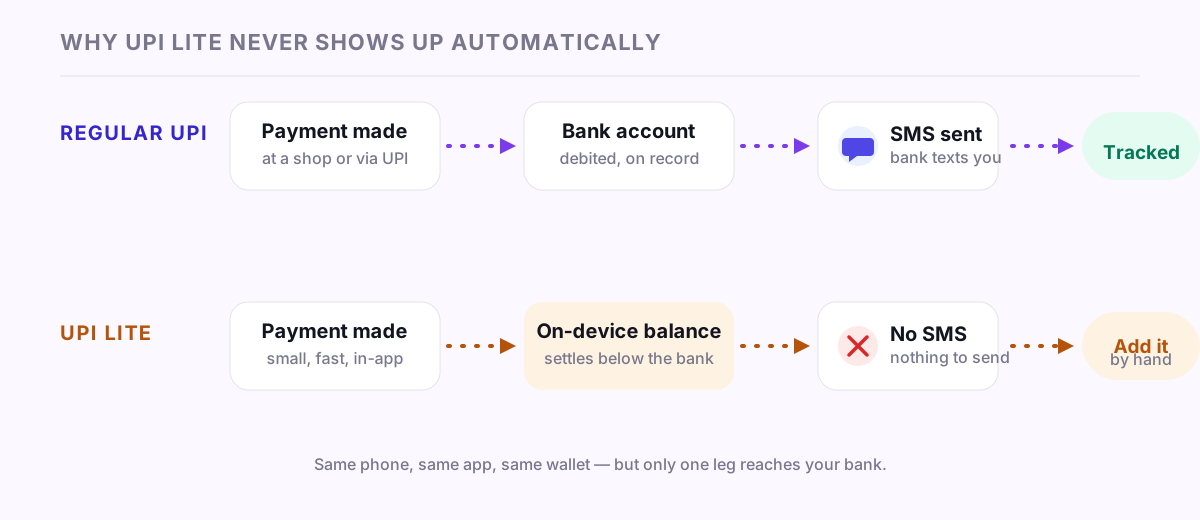
2. It was UPI Lite, not regular UPI
UPI Lite is a small-payment mode that settles on-device, below the bank rail, specifically so it can be fast. That speed is why it typically produces no per-transaction SMS at all — there's nothing for your bank to text you about, because your bank didn't process the leg you'd expect it to.
How to tell: check the app you paid with. If the payment shows as "UPI Lite" rather than a regular UPI transaction, this is expected, not a bug.
3. The app's background process was killed
This is the one worth understanding properly, because it explains most of the "it used to work, now it doesn't" complaints.
Android can notify an app the instant an SMS arrives — but only while that app's process is alive. If the battery optimiser killed it, you swiped it away from recents, or the phone's manufacturer aggressively manages background memory, the live notification is never delivered. On several popular Indian Android skins this is closer to the default behaviour than the exception.
There are two different ways trackers are built around this, and they fail differently:
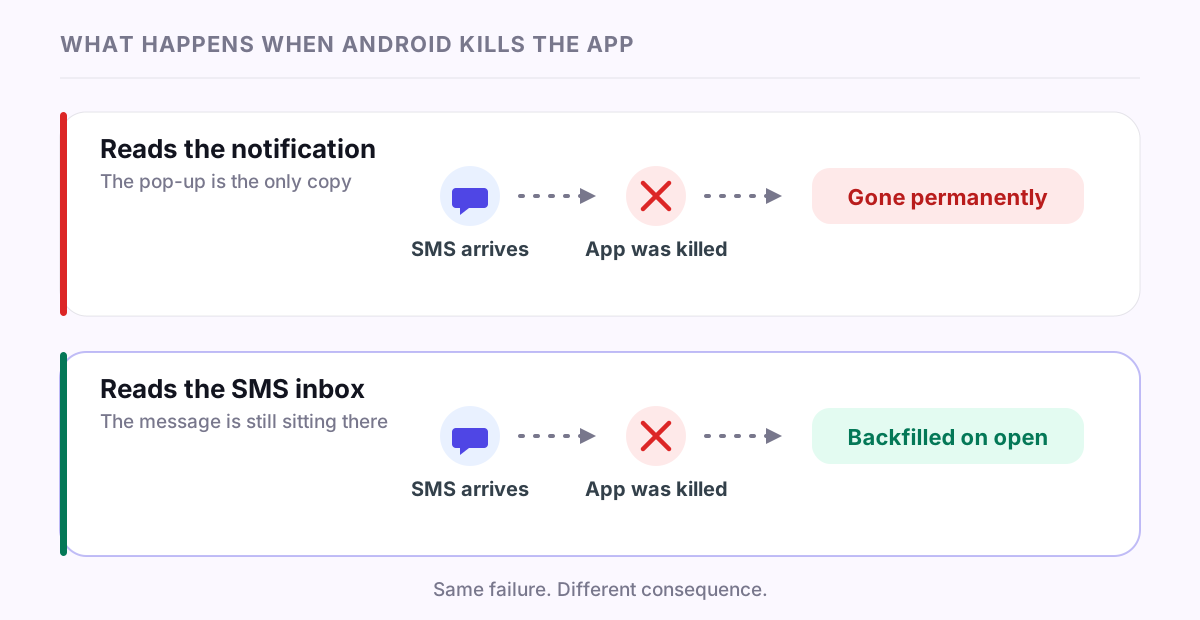
- Apps using a notification listener read the pop-up itself. Miss it, and it's gone — there's no second copy anywhere to recover.
- Apps that read the SMS inbox directly can recover, because the message is still sitting in your inbox regardless of what happened to the app's process. Opening the app lets it scan for anything the live path missed and backfill it.
That second design is why PaisaSync does both: a live receiver for instant capture, and an inbox scan every time you open the app to catch whatever the live path lost. A killed process becomes a short delay instead of a permanent gap.
How to tell: if the transaction eventually appears after you open the app, this was it — check that the SMS is genuinely still on your phone (see #4) if it never shows up.
4. The SMS itself got auto-deleted
Some phones and some third-party SMS apps clean up old messages automatically, or a spam filter silently routed the bank's message to a blocked or spam folder before your tracker ever saw it.
How to tell: search your default Messages app and also check its spam/blocked list, if it has one.
5. Dual SIM, and the wrong SIM has SMS access
If you carry two SIMs, some Android versions default the SMS-reading permission to a single SIM slot, or the OS handles per-SIM SMS routing in a way an app didn't anticipate. A transaction alert landing on the SIM the app isn't watching won't be picked up.
How to tell: check which SIM the bank's SMS actually arrived on, and confirm the tracker's SMS permission isn't scoped to only the other one.
6. The bank changed its SMS format
Banks periodically redesign the wording, sender ID, or structure of their alerts — often without warning anyone. A parser tuned to the old format can fail silently on the new one until it's updated for the change.
This is a genuine, permanent maintenance burden for any app in this category, and it's worth naming plainly: no SMS parser is ever "done." It's a continuous process of catching up to bank changes, not a one-time build.
How to tell: if a specific bank or card stopped being detected on a specific date, and older transactions from the same bank were fine, this is the likely cause. Worth reporting to whichever app you use — it's usually fixable on their end, just not instantly.
7. It's a wallet-to-wallet transfer, not a bank transaction
Money that moves entirely inside a wallet — between two Paytm or two Amazon Pay balances, say — sometimes never touches your bank account at all, and so never generates a bank SMS. The wallet knows about it; your bank doesn't.
How to tell: check the balance the payment came from in the paying app. If it was wallet balance rather than linked bank/UPI, this is expected.
8. It's cash
No automatic method — SMS parsing, Account Aggregator, anything — sees a cash payment. This one isn't a bug anywhere; it's the one gap every automatic tracker shares.
9. It's there, just miscategorised or filtered out of view
Sometimes the transaction isn't missing — it's sitting under the wrong category, or excluded by a filter or date range you forgot was active. Before concluding it's gone, check "All categories" and widen the date range.
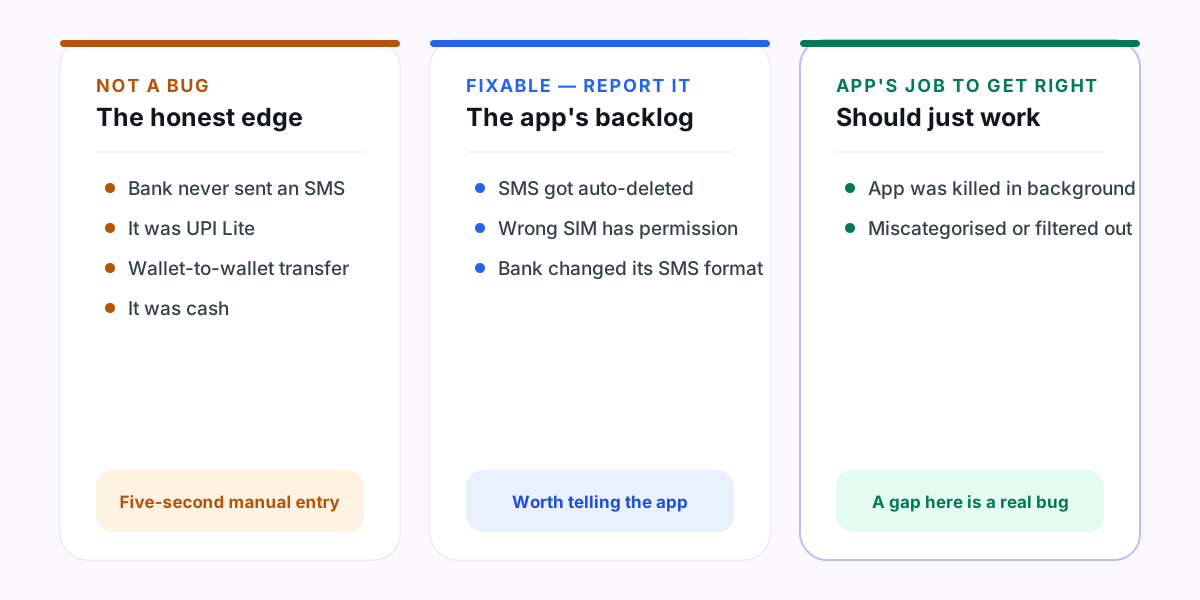
What this means practically
Roughly in order of how much you can do about them: #3 and #9 are the app's job to get right — a well-built tracker should recover from being killed and should make it easy to see everything, unfiltered. #5 and #6 are fixable but need the app's attention, and are worth reporting when you hit them. #1, #2, #7 and #8 are not bugs at all — they're the honest edge of what SMS-based tracking can see, and the fix is a five-second manual entry, not a broken app.
An app that claims to catch 100% of everything automatically is describing something that doesn't exist. The realistic bar — the one worth actually expecting — is that it catches the large majority of digital spending automatically, recovers cleanly from being killed in the background, and gets out of your way for the rest.
If you've hit a gap that isn't on this list, or want to know exactly how PaisaSync handles background killing on your specific phone, the FAQ and security page go into more detail — or reach out directly, listed there too.