Short answer: yes, on some phones, if the tracker is built the wrong way. Longer answer: it depends less on the app than most people assume, and more on a setting most people never look at.
I build PaisaSync. This is the honest version of how battery management interacts with an automatic expense tracker — not a list of exact menu taps, because those change with every OS update and I'd rather tell you something true than something specific-sounding.
Why phones do this at all
Every Android manufacturer is judged on battery life benchmarks, and background apps are the easiest thing to blame when a phone doesn't last the day. So most phones run some version of the same idea: aggressively suspend or kill apps sitting in the background, on the assumption that if you're not looking at an app, it shouldn't be doing anything.
For most apps that's a reasonable trade. For an app whose entire job is "notice something the instant it happens, even while you're not looking at it," it's a direct conflict with the phone's own instincts.
Not every phone does this equally
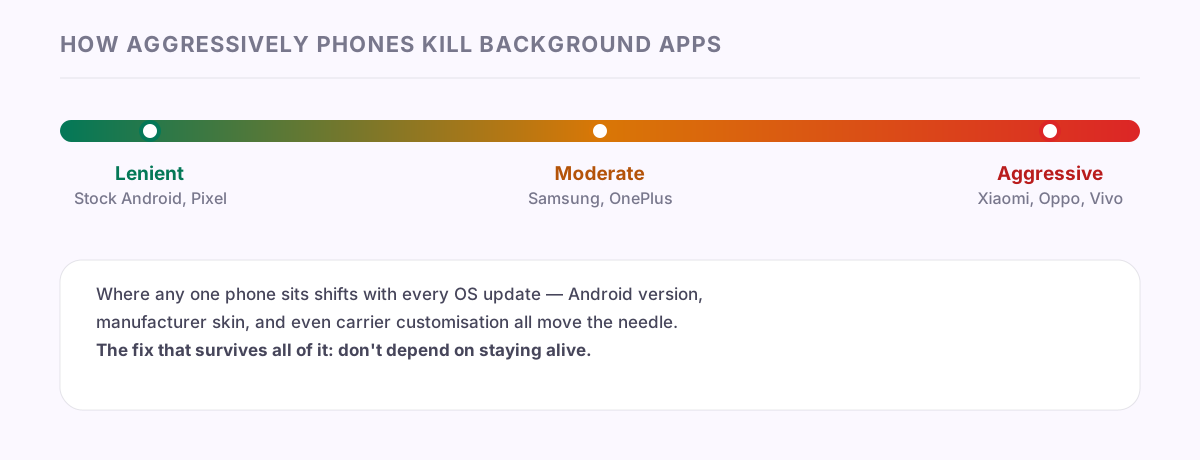
This isn't evenly distributed. Stock Android — Pixels, and phones that stay close to Google's default behaviour — tend to be the most lenient, using Android's built-in Doze and App Standby systems roughly as designed. Manufacturers that layer their own heavy customisation on top of Android — historically Xiaomi, Oppo, Vivo, and a few others — have tended to run additional, more aggressive background-killing logic on top of stock Android's own rules. Samsung and OnePlus generally sit somewhere in the middle.
None of this is fixed or permanent. It shifts with every software update, sometimes loosens after manufacturers get public pushback, sometimes tightens again for the next battery benchmark cycle. A precise ranking of "which phone is worst" today would likely be wrong in six months. What's stable is the pattern: the more a manufacturer customises Android, the more likely it is to manage background apps more aggressively than stock Android does.
What this actually breaks
If a tracker is built to rely on staying alive in the background to catch things as they happen, an aggressive background-kill can mean it simply isn't running when the thing it needed to catch — an SMS, a notification — arrives. Android delivers nothing to a process that isn't there.
I've written before about why a tracker misses transactions, and the background-kill scenario is one of nine causes covered there. It's worth repeating the core distinction here, because it's the actual answer to "does this matter":
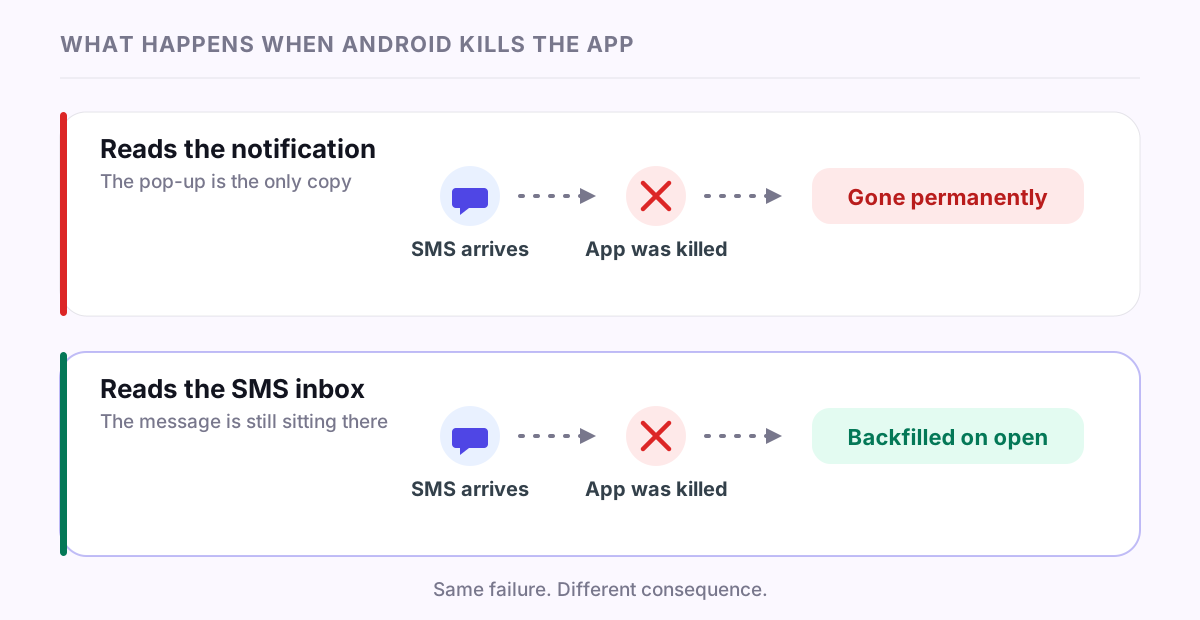
- A tracker that only reads the notification as it appears has no second copy to fall back on. If the app wasn't alive to see it, that transaction is gone.
- A tracker that reads the SMS inbox directly doesn't need to have been alive at the exact moment. The message is still sitting on the phone. Opening the app lets it scan for anything it missed and catch up.
That second design is why battery optimization matters less to PaisaSync than it would to a tracker built the other way — it's built with the assumption that the background process will get killed sometimes, on some phones, and designs around that instead of fighting it. A kill turns into a short delay until you next open the app, not a permanently missing transaction.
What you can actually do about it
Two honest, general things, rather than a list of exact settings that might already be wrong by the time you read this:
Check your phone's own battery settings for the app. Most Android phones have some version of a per-app battery permission — often called something like "Unrestricted," "No restrictions," or an autostart/background-activity toggle — reachable from the app's info page or the phone's battery settings. Setting it to the least restrictive option gives any app the best chance of staying alive for live capture. Where exactly this lives, and what it's called, varies by phone and changes across updates, which is why I'm not going to tell you to tap three specific menus that might not exist on your device.
Understand that "unrestricted" helps, but doesn't guarantee anything. Even with every setting maxed out in the app's favour, Android (and the phone maker's software on top of it) can still decide to kill a background process under memory pressure. That's not a bug to chase down — it's just how the platform works. The only thing that actually protects you from it is a tracker that doesn't depend on having stayed alive.
If you want a second opinion beyond a single app's word for it, dontkillmyapp.com tracks manufacturer background-restriction behaviour in more device-specific detail than I'd trust myself to keep accurate here.
The honest bar
An app that claims battery optimization never affects it is either built differently from every other Android app, or not being straight with you. The realistic claim — the one I'd actually stand behind — is narrower: a kill causes a delay, not a permanent gap, because the design assumes the kill is going to happen rather than hoping it won't.
If you've noticed a specific phone or a specific update change how reliably your tracker keeps up, that's useful to know — the FAQ and security page have more on how PaisaSync is built, or reach out directly, listed there too.